






Spinfin Casino Registration
Spinfin casino registration is a short two-step process built around your email address, and it is where you choose your currency and pick which welcome offer to attach to your account. For UK players that means setting GBP from the start and deciding between the casino welcome pack, the sports welcome bonus, a promocode or no bonus before you make a first deposit.
This Spinfin casino registration guide covers each field on the sign-up form, how the bonus selection works, what verification to expect and how to fund your account once it is open. The whole flow runs in the browser on desktop and mobile - there is no app to install first.
Table of contents
| Registration essentials | Details |
|---|---|
| Where to sign up | REGISTER button, top-right of spinfin.com |
| Steps | Two ("Registration 1/2") |
| Required details | Email, password, country, currency |
| Promocode field | Optional - "I have a promocode!" |
| Minimum age | 18+ |
| Currency | GBP (£) for UK accounts |
| Verification (KYC) | Usually at first withdrawal |
| Support | 24/7 live chat and email |
How to register at Spinfin casino
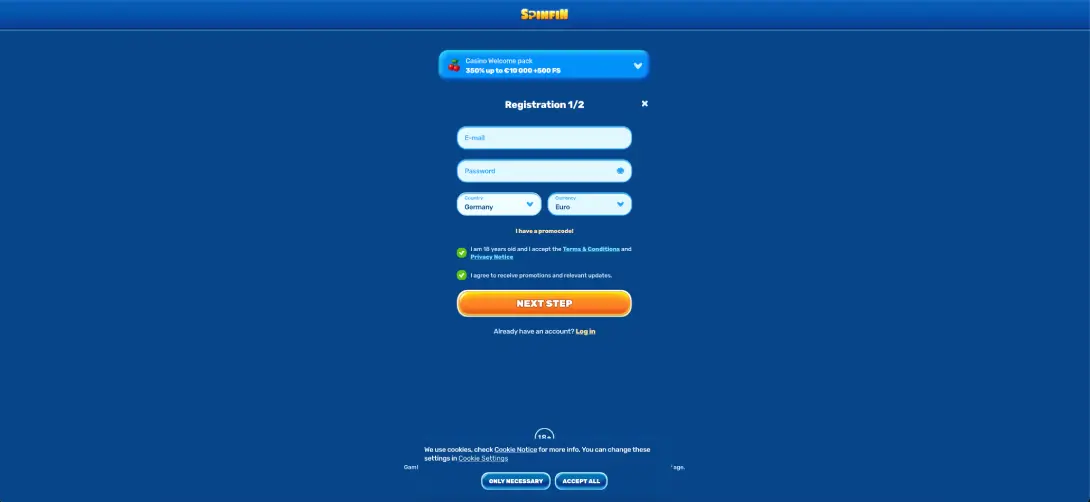
The sign-up window is labelled Registration 1/2 and keeps the first step deliberately short - email, password, country and currency, plus the consent boxes. A welcome-pack banner sits above the form so you can see the headline offer while you complete it.
Step-by-step sign up
- Open spinfin.com and click REGISTER in the top-right corner.
- Enter a valid email address in the E-mail field.
- Create a password - use the eye icon to check it before continuing.
- Set Country to United Kingdom and Currency to Pounds (GBP).
- If you have one, tick I have a promocode! and type the code.
- Tick the box confirming you are 18 and accept the Terms & Conditions and Privacy Notice.
- Optionally tick the box to receive promotions and updates.
- Press NEXT STEP and complete the remaining profile details on step 2 to finish.
Choosing your bonus at sign-up
Spinfin lets you decide up front how your account starts. During registration you can head towards the casino welcome pack (350% up to £8,600 + 500 free spins), the sports welcome bonus (130% up to £430), enter a promocode instead, or opt for no bonus if you would rather play with none of the attached wagering. You do not need a code for the main welcome offers - the promocode field is only for separate, code-specific deals.
CLAIM BONUSVerification and account security
You can register and browse before verifying, but identity checks (KYC) are normally triggered at your first withdrawal. When prompted you will usually be asked for proof of identity - a passport or driving licence - and proof of address such as a recent utility bill or bank statement. Completing this soon after registering keeps your first cash-out from being delayed. Connections are secured with SSL encryption, and you can switch on two-factor authentication for sign-ins.
Making your first deposit
Once registered, open the cashier and choose a deposit method in pounds. The minimum deposit starts at around £10 across most options.
- Log in and open the cashier from your account area.
- Select a method - Visa, Mastercard, bank transfer, Revolut, Paysafecard or crypto.
- Enter the amount (from around £10) and confirm any linked bonus.
- Authorise the payment and wait for the balance to update.
- Open your chosen game or place your first bet.
Registration tips for UK players
- Set the currency to GBP at step 1 - it defines how bonuses and limits display throughout your account.
- Use an email you check regularly, since verification and reset links are sent there.
- Decide on your bonus before depositing - switching afterwards is not always possible.
- Read the welcome-pack terms first, as it releases in stages with its own wagering.
- Only ever register on the official spinfin.com domain.
Common registration issues
- Email already in use: you may already have an account - use the login window and reset the password instead.
- Form won't submit: check both consent boxes are handled and all required fields are filled, then clear the cache and retry.
- Promocode rejected: confirm the code is current and spelled exactly; expired or mistyped codes will not apply.
FAQ
What is the easiest way to register at Spinfin casino?
Click REGISTER at the top-right of spinfin.com, enter your email and password, set your country and GBP currency, accept the terms and press NEXT STEP to finish on step 2.
Do I need a promocode to register?
No - The main casino and sports welcome offers apply without a code. The "I have a promocode!" field is only for separate code-specific promotions.
Is it possible to set my account in pounds?
Yes - Choose GBP as your currency during step 1 of registration, and the cashier and bonuses will display in pounds.
How old do I have to be to sign up?
You must be at least 18 and confirm this during registration.
When do I need to verify my account?
Verification is typically requested at your first withdrawal - expect to provide proof of identity and proof of address.
How quickly can a Spinfin account be created?
The first step takes a minute or two. The account is ready to fund once you complete the second step of the form.