






Spinfin Casino App
Players often search for a Spinfin casino app, so the honest answer first: there is no native app to download from the App Store or Google Play. Instead, Spinfin runs as a full mobile site that opens in any modern browser, and it carries the same 6,600-plus slots, live dealer tables, sportsbook and GBP cashier as the desktop version. Nothing is stripped back for mobile - the browser is the app.
This Spinfin casino app guide explains how to reach the site on your phone, how to add it to your home screen so it behaves like an installed app, what works on mobile, and how payments and security are handled on the go.
Table of contents
| Feature | Mobile browser details |
|---|---|
| Download required | No - runs entirely in the browser |
| iOS access | Safari, Chrome or Firefox - full support |
| Android access | Chrome, Firefox or any modern browser |
| Home-screen shortcut | Available on both iOS and Android |
| Slots catalogue | 6,600+ titles - identical to desktop |
| GBP deposits and withdrawals | Full cashier available on mobile |
| Bonus access | Welcome pack, Store, Challenges and tournaments |
| Live casino | 237 tables streamed on mobile browsers |
| Sports and live betting | Available on mobile |
| Security | SSL encryption - same as desktop |
| Updates | Automatic - no manual updates needed |
Is there a Spinfin casino app for Android or iOS?
No. Spinfin does not publish a native Android or iOS app, and you will not find one to install. This is a deliberate design choice shared by many browser-first casinos: it removes the need for downloads, storage space and manual updates, and it means the mobile site always matches the current desktop build. If you see a third-party "Spinfin app" listed elsewhere, treat it with caution - the official route is the mobile browser.
How to access Spinfin on mobile
- Open your mobile browser - Safari, Chrome or Firefox.
- Type spinfin.com into the address bar.
- Log in or tap REGISTER to create an account in GBP.
- Use the menu icon to browse Casino, Sports and Bonuses.
- Play, deposit or bet directly in the browser.
How to add Spinfin to your home screen
A home-screen shortcut gives you an app-style icon that opens the casino in one tap, without a download.
iOS (Safari)
- Open spinfin.com in Safari on your iPhone or iPad.
- Tap the Share icon at the bottom of the screen (the square with an arrow pointing up).
- Scroll the share sheet and tap Add to Home Screen.
- Confirm the name and tap Add.
- The icon appears on your home screen and opens the casino directly.
Android (Chrome)
- Open spinfin.com in Chrome on your Android device.
- Tap the three-dot menu in the top-right corner.
- Select Add to Home screen.
- Confirm the shortcut name and tap Add.
- Launch Spinfin from the new icon whenever you want to play.
Features available on mobile
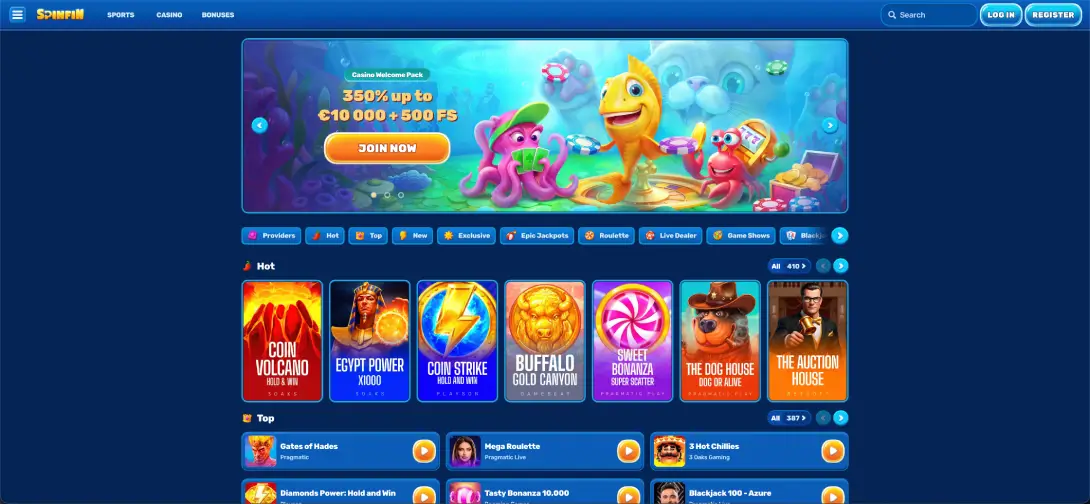
- Full games lobby: all slots, table games and Hold & Win titles, with the same category filters as desktop.
- Live casino: the Gold Saloon studio, roulette, blackjack and game shows all stream on mobile.
- Sportsbook: pre-match and in-play betting with the bet slip and Top Bets panel.
- Cashier: deposits and withdrawals in pounds across cards, bank transfer and crypto.
- Rewards: the welcome pack, coins, Store, Challenges and tournaments.
Performance on mobile
- Lobby loading: the homepage loaded within about two seconds, with game tiles rendering shortly after.
- Slot performance: titles from Pragmatic Play and 3 Oaks launched in under three seconds with steady frame rates.
- Live casino stability: Evolution and Pragmatic Live streams held steady through a 10-minute session on a mid-range Android device.
- Cashier speed: the GBP deposit screen loaded quickly and a test entry processed without stalling.
Mobile payments and withdrawals in GBP
The mobile cashier mirrors desktop. Deposits start at around £10 and cover cards, bank transfer, Revolut, Paysafecard and crypto; withdrawals cover cards, bank transfer and crypto.
| Type | Methods | Range (GBP) |
|---|---|---|
| Deposit | Visa, Mastercard, Paysafecard | £10 – £1,700 |
| Deposit | Bank transfer | £10 – £3,400 |
| Deposit | Revolut | £10 – £860 |
| Deposit / Withdrawal | Bitcoin, Litecoin, Cardano, Ethereum, USDT, USDC | £10 – £4,300 |
| Withdrawal | Visa, Mastercard, bank transfer | £10 – £4,300 |
Note that Revolut and Paysafecard are deposit-only - if you fund with either, choose a card, bank transfer or crypto for your payout.
CLAIM BONUSSecurity on the mobile version
The mobile site uses the same SSL encryption as desktop, and two-factor authentication carries across to mobile logins. Because there is no downloaded app, there is no separate permission set or offline data to manage - you sign in through the browser each session, which many players prefer for keeping the account contained to the official domain.
Usage tips for UK players
- Add the home-screen shortcut for one-tap access without a download.
- Play live tables on Wi-Fi where you can, since streams use more data than slots.
- Let your browser store the password securely to speed up login.
- Keep your mobile browser updated so the site renders correctly.
FAQ
Is there a Spinfin casino app?
No - Spinfin has no native Android or iOS app. The full casino, sportsbook and cashier run in the mobile browser instead.
What is the easiest way to get Spinfin on my home screen?
On iOS, use Safari's Share menu and tap Add to Home Screen. On Android, use Chrome's menu and tap Add to Home screen. Both create an app-style icon.
Is it possible to deposit and withdraw on mobile?
Yes - The mobile cashier is the full version - deposits and withdrawals in pounds across cards, bank transfer and crypto.
Does the live casino work on mobile?
Yes - All 237 live dealer tables, including the Gold Saloon studio, stream directly in the mobile browser.
Is the mobile version secure?
Yes - It uses the same SSL encryption as desktop, and two-factor authentication applies to mobile logins too.
Will I miss any features without an app?
No - The mobile browser version carries the same games, bonuses, sportsbook and cashier as desktop, and updates automatically.