






Spinfin Casino Login
The Spinfin casino login opens your full account - the cashier in pounds, active bonuses and free spins, tournament and challenge progress, the sportsbook bet slip and your VIP level. Signing in works the same way on desktop and mobile, since Spinfin runs entirely in the browser, so the same email and password get you into every part of the platform without a separate app.
Access is protected with SSL encryption and, where you enable it, two-factor authentication. This Spinfin casino login guide covers how to sign in, how to reset a forgotten password, how to log in on mobile and how to clear the errors that most often block access.
Table of contents
| Login essentials | Details |
|---|---|
| Where to log in | Log In button, top-right of spinfin.com |
| Login method | Registered email + password |
| Two-factor authentication | Optional - recommended for account security |
| Password reset | Via "Forgot your password?" on the login window |
| Device support | Desktop and mobile browsers - no download |
| Session security | SSL encryption |
| When verification appears | Usually at first withdrawal (KYC) |
| Currency | GBP (£) |
| Support | 24/7 live chat and email |
How to log in to Spinfin casino
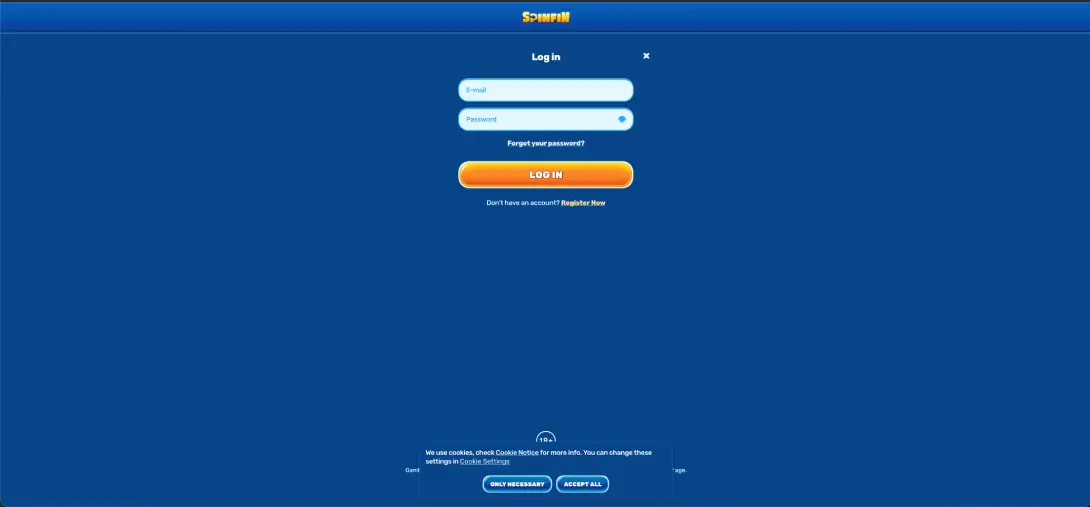
The login window is a compact overlay with two fields, a password-reveal icon and a link to recover a forgotten password. If you already have an account, signing in takes only a few seconds.
Step-by-step login
- Open spinfin.com in your browser.
- Click the LOG IN button in the top-right corner of the page.
- Enter the email address you used when registering.
- Type your password - use the eye icon to check it, as the field is case-sensitive.
- Complete two-factor authentication if you have it switched on.
- Click LOG IN and wait for the account area to load without refreshing.
Create an account if you don't have one
If the login fails because you have not registered yet, the window links straight to sign-up via Register Now. Registration is a two-step process.
Quick registration flow
- Click Register Now from the login window, or REGISTER in the header.
- Enter your email and a password on step 1 of 2.
- Select your country and set the currency to GBP.
- Optionally tick I have a promocode! and enter a code.
- Confirm you are 18+, accept the terms and press NEXT STEP.
Secure login practices
- Use a unique password you do not reuse on other sites.
- Switch on two-factor authentication for an extra layer at sign-in.
- Avoid logging in over public or shared Wi-Fi where possible.
- Log out fully on devices you share with other people.
- Only ever sign in on the official spinfin.com domain - check the address bar.
Password recovery
A forgotten password does not lock you out permanently - the reset link sits directly on the login window.
Reset steps
- Open the login window and click Forgot your password?
- Enter the email address linked to your account.
- Open the reset email and follow the secure link.
- Create a new password and confirm it.
- Return to the login window and sign in with the new details.
Mobile login
Because Spinfin has no separate app, the mobile login is identical to desktop - the same overlay in the top-right of the mobile site.
Tips for mobile
- Add a home-screen shortcut so the login page is one tap away.
- Let your browser store the password securely rather than typing it each time.
- If the keyboard hides the LOG IN button, scroll the overlay up slightly before submitting.
Troubleshooting common login errors
Incorrect credentials
The most common cause is a mistyped password. Reveal the field with the eye icon, check Caps Lock is off, and confirm you are using the exact email from registration. If it still fails, reset the password rather than retrying repeatedly.
Browser or cache issues
If the login page loads but the form does not respond, or the session drops after you submit:
- Clear the browser cache and cookies, then reload the page.
- Disable extensions that block scripts or third-party content.
- Try a different browser - Chrome and Safari both performed reliably during our tests.
Two-factor code fails
Check that your device clock is set to update automatically, since a drifting clock breaks time-based codes. Request a fresh code and enter it promptly before it expires.
Account blocked or restricted
Repeated failed attempts or a pending verification can temporarily hold an account. In that case, contact live chat - support can confirm the status and tell you whether any documents are outstanding.
CLAIM BONUSWhat you access after login
- The cashier for deposits and withdrawals in pounds.
- Active bonuses, free spins and wagering progress.
- Coins, the Store, Challenges and tournament standings.
- The sportsbook, bet slip and bet history.
- Your VIP level and account settings.
Account verification (KYC)
Verification usually appears at your first withdrawal rather than at login. When prompted, you will typically be asked for proof of identity (a passport or driving licence) and proof of address (a recent utility bill or bank statement). Completing this early means your first cash-out is not held up while documents are checked.
FAQ
What is the easiest way to log in to Spinfin casino?
Click LOG IN at the top-right of spinfin.com, enter your registered email and password, complete two-factor authentication if enabled, and press LOG IN.
I forgot my Spinfin casino password - what now?
Use the "Forgot your password?" link on the login window, enter your email, and follow the reset link sent to your inbox to set a new password.
What can prevent access to my Spinfin casino account?
The most common causes include a mistyped password, cached browser data, a failed two-factor code, or a pending verification. Reset the password, clear the cache or contact live chat if it persists.
Is it possible to log in on my phone?
Yes - The mobile login is the same browser-based overlay as desktop - no app required. A home-screen shortcut makes it quicker.
Is two-factor authentication available?
Yes, and enabling it is recommended. It adds a one-time code step to each sign-in for extra protection.
When will I be asked to verify my account?
Verification is normally triggered at the first withdrawal. Expect to submit proof of identity and proof of address.